
Forms & exams · Updated October 2026
Resize photo and signature for online application forms
The form wants a photo “between 20 and 50 KB” and a signature of 140 × 60 pixels, and your phone photo is 4 MB? Set the pixel size, tick Keep the file under, type the KB limit and download — the real file size is shown before you save. Free, in your browser, and your photo and signature are never uploaded.
One click
Start from a typical form size
These are combinations that appear on many recruitment, exam and admission forms. Check the numbers against your own notice — if they differ, open the link and change them in the panel. Each link opens the resizer with the size, limit and JPG already set.
Each link opens the resizer with these settings already filled in — you only choose the photo and press Download. Nothing is uploaded; the work happens in your browser.
Step by step
How to resize a photo and a signature for a form
Do the photo first, then repeat the same steps for the signature. Each takes about a minute.
-
01
Prepare the original
For the photo: plain light background, face straight to the camera, good daylight. For the signature: sign with a dark pen on plain white paper, take a straight-on photo in good light (or scan it), no shadows. You can crop away the empty paper in the next step.
-
02
Open it and set the shape
Click Choose a photo or drag the file in. Under New size switch the lock off and type the pixel width and height from your form (or choose cm and the DPI). The frame locks to that shape — drag it over the face, or over the signature so that it fills the frame. The picture is cropped, never stretched.
-
03
Choose JPG and the KB limit
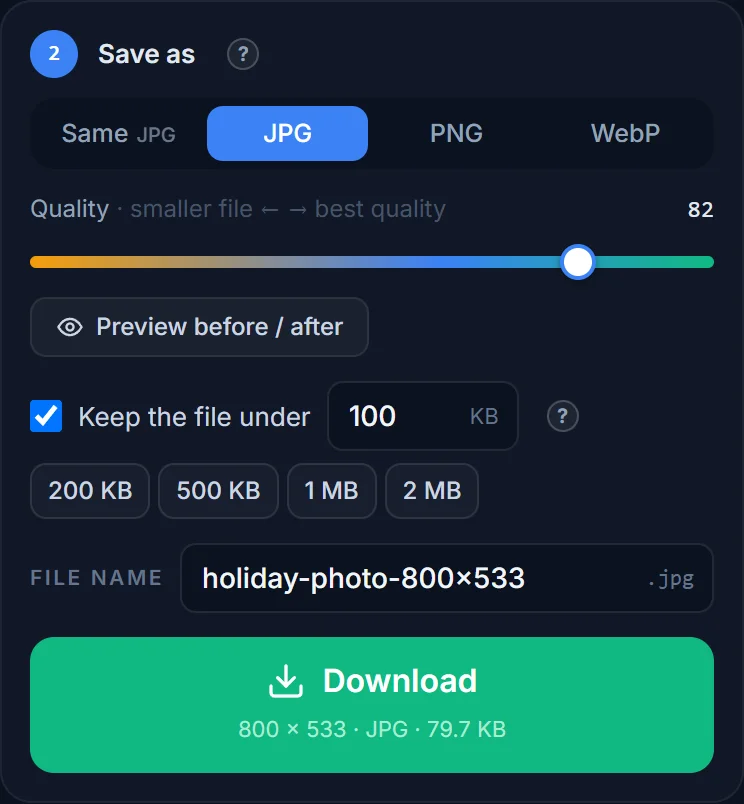
Under Save as pick JPG (forms almost always ask for JPG/JPEG), tick Keep the file under and type the maximum from your form: 50 for “50 KB”, 20 for “20 KB”. The lowest limit the tool accepts is 10 KB.
-
04
Check the real size and download
The Download button shows the exact result, for example 200 × 230 · JPG · 47 KB. Check it against the form’s minimum and maximum. If the tool says it cannot get under the limit, make the picture smaller in pixels and try again. You can rename the file in the File name box (short, letters and digits, e.g. signature).
-
05
Repeat for the signature, then upload
Start again with the signature file and its own pixel size and limit. When both files are ready, upload them on the form and re-open the preview there if the portal offers one.
Reference
Typical photo and signature limits on application forms
Examples of combinations that appear on many recruitment, exam and admission forms — shown so you know the order of magnitude, not as the rules of any particular website.
| Upload | Typical pixel size | Typical file size |
|---|---|---|
| Passport-style photo | 200 × 230 px | 20–50 KB |
| Photo given in centimetres | 3.5 × 4.5 cm (≈ 276 × 354 px at 200 DPI) | 20–50 KB |
| Signature | 140 × 60 px | 10–20 KB |
| Signature given in centimetres | 4 × 2 cm (≈ 315 × 157 px at 200 DPI) | 10–20 KB |
| Thumb / finger impression | 240 × 240 px | 20–50 KB |
| Handwritten declaration | 800 × 400 px | 50–100 KB |
| Pas foto 3 × 4 cm (Indonesia) | 354 × 472 px at 300 DPI | often 100–200 KB |
| Ảnh thẻ 3 × 4 cm or 4 × 6 cm (Vietnam) | 354 × 472 px or 472 × 709 px at 300 DPI | set by the form |
Always follow the notice for your own application. Pixel sizes, KB limits, formats and even the ink colour change from one recruitment cycle to the next, and a form that works for one portal may be wrong for another. If your form gives centimetres instead of pixels, choose cm in the New size panel and set the DPI it mentions (200 DPI is a common request; 300 DPI is the print default).
Photo or signature?
A photo and a signature are two different jobs
A photo is a portrait shape — taller than wide — and the priority is the face: centred, well lit, filling most of the height. Use the crop frame to choose the part of your phone photo to keep, and let the pixel size do the rest. At 200 × 230 pixels a JPG fits comfortably under 50 KB.
A signature is the opposite: a wide, thin strip of dark ink on white. The enemy here is too much empty paper. If you upload a photo of a whole sheet and the portal squeezes it into 140 × 60 pixels, the signature turns into a grey thread. Crop tightly around the signature so it touches almost all four sides of the frame, keep the paper white and the ink dark, and the strip stays legible even at 10–20 KB.
Both are very small images, which is why the pixel size matters more than the quality slider. See which pixel size fits which KB limit for the general table.
Minimum and maximum
When the form wants a size “between 20 and 50 KB”
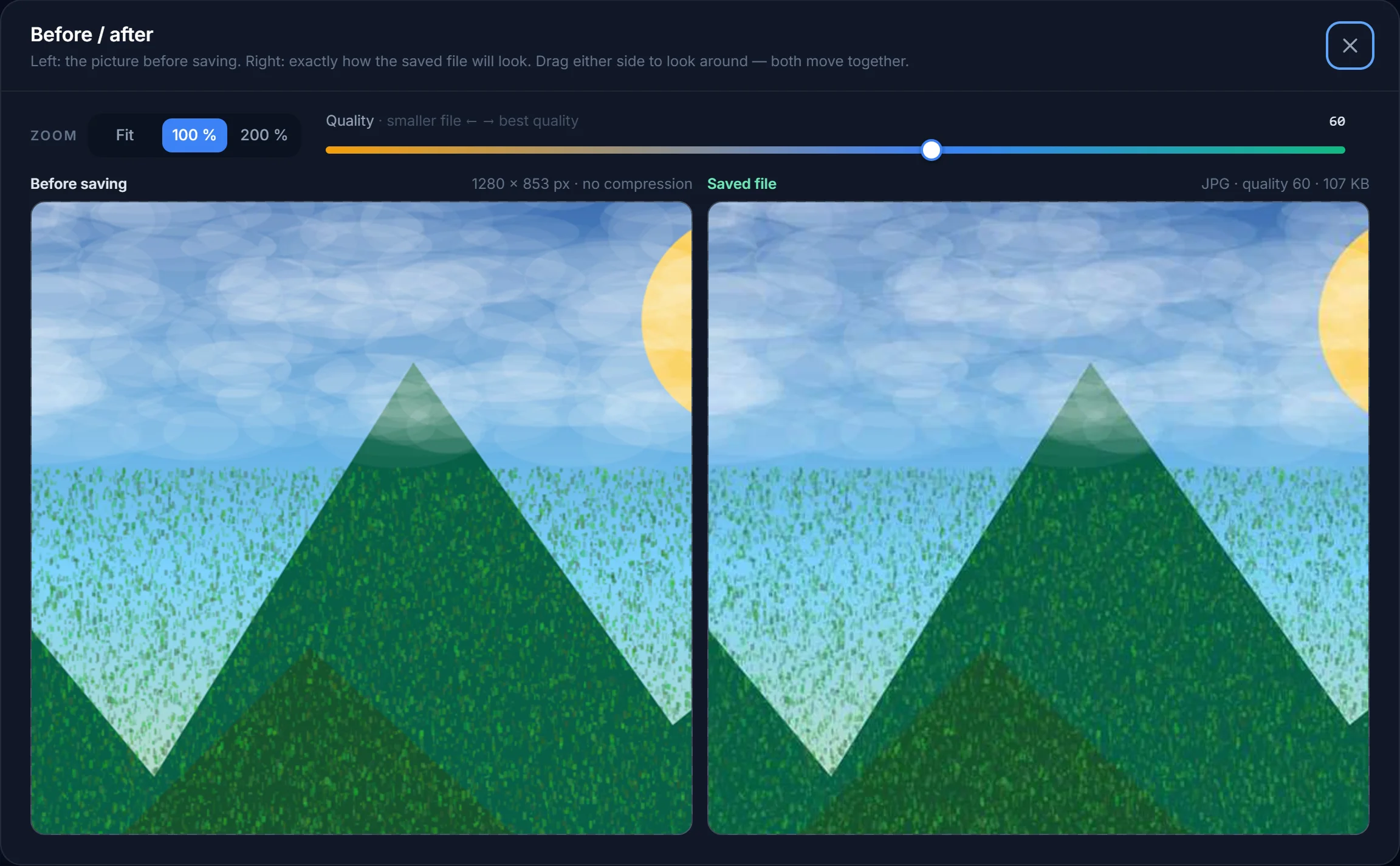
Keep the file under sets a maximum. The tool starts from the Quality slider (82 by default) and only lowers it if the file is too big — it never raises quality to fill the allowance, and it never changes the pixels. So a very small image can come out far below your limit: a 140 × 60 px signature may be only 4 KB, and a portal that insists on “at least 10 KB” would reject it.
To land inside a window, work with the two knobs together:
- Raise the Quality slider to 90–95 first, so the file starts large.
- Tick Keep the file under and enter the maximum (say 50). If the file is above 50 KB, the tool lowers the quality just enough; if it is already below, you keep the high quality you chose.
- Read the size on the Download button. Still under the minimum? Type a slightly larger width and height (add 20–30 %) and it grows. Still over the maximum with quality at its lowest? Use fewer pixels.
Mind that the form’s “KB” is normally 1,024 bytes, the same number that Windows, macOS and phone galleries show in the file’s properties — and the number on the Download button.
Format and file name
JPG or PNG, and why the file name matters
JPG is what nearly every form asks for, and it is the only format that gives you a small file for a photo. Choose it explicitly under Save as; do not leave the format on Same if your original is a PNG, HEIC or WebP file. PNG is lossless, so a face photo comes out several times bigger than the same JPG and the KB limit cannot be applied to it. WebP is smaller still but many portals do not recognise it.
Photos from an iPhone are usually HEIC. The tool opens them and saves a normal JPG — no separate converter needed (see HEIC to JPG). Some portals check the extension: the tool writes .jpg, which is accepted wherever .jpeg is. Rename the file with the File name box to something short without spaces or symbols — photo and signature are fine; very long names, brackets, accents and emoji sometimes make a form’s uploader fail.
Why uploads get rejected
The usual reasons a form says “invalid file”
- Above the maximum KB — the most common one. Tick the limit and re-save.
- Below the minimum KB — a tiny image saved at low quality. Raise the quality or add some pixels (see above).
- Wrong pixel size or proportions — a photo that is 4:3 when the form wants 7:9 is squashed or refused. Lock the frame to the exact size so the picture is cropped, not stretched.
- Wrong format — PNG, WebP or HEIC when the form wants JPG. Save as JPG.
- Sideways picture — phone photos carry a rotation flag that some portals ignore. The tool applies the rotation and saves the picture upright; you can also rotate by hand.
- Hard to read — a dark photo, a blurred signature, shadows across the face or paper. No resizer fixes a bad original; retake the picture in daylight.
- Old, edited or filtered photo — many forms want a recent, unretouched picture. Resizing and cropping are fine; beauty filters and AI retouching are not.
The tool does not remove or change the background, so take the photo in front of a plain wall. If you need ID-photo proportions and country rules, use the passport photo guide.
Examples from different countries
India, Indonesia, Vietnam and elsewhere
The same task appears all over the world with different numbers. Online recruitment, entrance-exam and scholarship forms in India typically ask for a passport-style photo and a signature, sometimes a thumb impression and a handwritten declaration, each as a JPG with a maximum of a few tens of KB. In Indonesia, school admissions, job applications and civil-service registrations ask for a pas foto — 2 × 3, 3 × 4 or 4 × 6 cm — as a JPG, often with a limit of 100–200 KB. In Vietnam, job and school files typically need an ảnh thẻ in 3 × 4 or 4 × 6 cm. University and visa portals elsewhere in the world follow the same pattern with their own numbers.
What changes between countries and years is the exact number, never the method: set the shape, choose JPG, set the limit, read the real size. If your form quotes centimetres, enter them in the cm unit with the DPI it names; if it quotes pixels, type pixels. Exams and recruitment drives run in waves through the year, and the portals are often busiest in the last days before a deadline — prepare both files a day early so a rejected upload is not a crisis.
Privacy
Your photo and signature stay on your device
A signature is sensitive. Many online “photo and signature resize” sites upload your files to a server and keep them for a while. This tool does not: the resizing, cropping and JPG encoding happen inside your browser, on your own device, and nothing is stored. The only files that touch our server are HEIC, TIFF, PSD and SVG images (formats browsers cannot open), which are converted in memory and discarded at once. The original file on your computer is never changed.
How do I resize a photo and signature to 20 KB?
Open the file, type the pixel size your form asks for (or a width of about 300 px for a photo, 140 px for a signature), choose JPG, tick Keep the file under and type 20. The Download button shows the real size. Do the photo and the signature as two separate files.
What is the size of a photo for an online application form?
There is no single answer — it is set by each form. Combinations such as 200 × 230 px at 20–50 KB, or 3.5 × 4.5 cm at 200 DPI, are common on recruitment forms, and 3 × 4 cm photos are common in Indonesia and Vietnam. Take the numbers from the notice of your own application.
The form says the signature must be at least 20 KB. How do I make it bigger?
Raise the Quality slider to 90–95 and increase the width and height by 20–30 %; the file grows. Then tick the maximum limit if there is one. The Download button shows the size, so you can adjust until it is inside the window.
Can I resize a signature to 140 × 60 pixels?
Yes. Switch the proportion lock off, type 140 and 60, then drag the frame so the signature fills it. The picture is cropped to that shape, not stretched. Choose JPG and, if needed, a KB limit such as 20.
Why is my file still above the limit?
At very small limits quality alone cannot do it: a 1500-pixel picture will not fit in 20 KB at any quality. Type a smaller width and height — the tool then finds the quality that fits. The amber warning under Save as appears when the limit cannot be reached.
Can I convert the photo to 10 KB?
The lowest limit the tool accepts is 10 KB. At that size you need a small picture, roughly 200 × 200 px or less, and a plain background.
Should I save as JPG or PNG for a form?
JPG, unless the form explicitly says PNG. JPG is accepted everywhere and gives a much smaller file for photos; the KB limit only works with JPG and WebP.
Is my signature uploaded to your server?
No. Everything happens in your browser. Only HEIC, TIFF, PSD and SVG files are converted on our server first, in memory, because browsers cannot open them, and they are discarded immediately.
Get your photo and signature ready
Set the pixels, set the KB limit, read the real file size, download. Free, and nothing leaves your device.